
ToFu · Troubleshooting Guide · Search-Intent Content
How to Turn On Muha Gen 3: What to Do, What to Check, and Why It May Not Respond
If you are trying to figure out how to turn on a Muha Gen 3 device, the first thing to know is that most versions are designed to be draw-activated rather than button-powered. That means there is usually no separate “power on” step. This guide explains how Muha Gen 3 activation works, what the indicator behavior means, and what to do if the device does not respond as expected.
Key Takeaways
- Most Muha Gen 3 devices are activated by inhaling, not by pressing a power button.
- If the device does not respond, the issue is usually battery, airflow, charging, or an internal connection problem.
- Indicator lights can help you understand whether the device is charging, firing, or not receiving power.
- Simple troubleshooting steps often solve the problem without assuming the device is defective.
Does Muha Gen 3 Have a Power Button?
Most versions are draw-activated
In most cases, Muha Gen 3 devices do not require a manual power-on action. Instead, the internal sensor detects airflow when you inhale and automatically activates the heating system. This is why many users think the device is “off” when it is actually waiting for a draw input.
Why this causes confusion
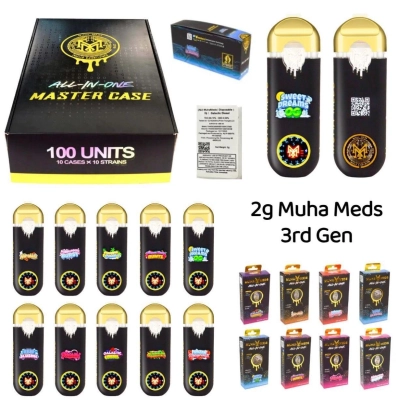
Many disposable designs look advanced enough that users expect a button or a click sequence. But with a typical muha med disposable, the standard experience is automatic activation rather than manual startup.
How to Turn On Muha Gen 3
Step 1: Check whether the device is charged
If your version includes a rechargeable battery, connect it to the correct charging cable and let it charge briefly before testing. A low battery is one of the most common reasons a device appears inactive.
Step 2: Take a slow, steady inhale
Once charged, place the mouthpiece to your lips and inhale gently for a second or two. Avoid very short or extremely weak puffs, since the airflow sensor may not register them.
Step 3: Watch for indicator response
A working device will usually show a light response while firing. If there is still no light, move on to the troubleshooting section below.
What the Light on Muha Gen 3 Usually Means
Solid light during inhalation
A solid light often means the device is heating correctly and responding to airflow as intended.
Blinking light
A blinking light may indicate low battery, poor charging contact, an airflow issue, or an internal protection trigger.
No light at all
No light generally means the device is not receiving power, is not charged, or is not activating through the sensor.
Why Muha Gen 3 May Not Turn On
The battery may be too low
Rechargeable versions need enough battery power to activate the internal coil. If the charge level is too low, the device may appear completely unresponsive.
The airflow sensor may not be triggering
If the draw path is partially blocked or the inhale is too light, the sensor may fail to activate. This is especially important when evaluating hardware at scale through muha meds bulk purchasing, where consistent activation behavior matters for customer experience.
The connection could be faulty
In some cases, the internal contact between battery and heating system may be unstable, which prevents firing even if the battery has power.
How to Charge Muha Gen 3 Properly
Use the correct cable and port
Many newer devices use USB-C charging. Use a standard compatible cable and avoid damaged connectors.
Charge before assuming failure
If the device has been stored for a while, give it enough time to recharge before testing again. Charging first eliminates one of the most common false failure signals.
How Long Should You Inhale to Test Activation?
A steady draw works better than a quick puff
A short test puff may not trigger the sensor consistently. Try a slow, steady inhale instead of a sharp pull. This gives the device enough time to detect airflow and engage the heating circuit.
When the Device Lights Up but Still Does Not Hit
Activation is not the same as vapor production
If the light appears but there is no usable response, the device may be activating electrically while still having an airflow, clogging, or internal heating issue. This distinction matters for both users and retailers handling muha meds vape inventory.
What Makes Muha Gen 3 Different From Earlier Versions?
Updated design expectations
Consumers often expect more visible feedback from newer devices, including screens, lights, or clearer battery behavior. That is one reason terms like muha meds v3 attract searches tied to activation, charging, and troubleshooting.
Frequently Asked Questions
Do I need to click a button five times?
Usually no. Most Muha Gen 3 devices are inhale-activated and do not rely on a traditional button-based power sequence.
Why is my Muha Gen 3 blinking but not working?
This often points to low battery, charging issues, a blocked airflow path, or a protection response rather than a missing “on” switch.
Can a brand new device still seem off?
Yes. A new device can still require charging or a proper airflow trigger before it appears responsive.
Final Thoughts
The simplest answer
In most cases, you do not manually turn on Muha Gen 3. You charge it if needed, inhale steadily, and let the draw sensor do the rest. If it still does not respond, battery level, airflow, and internal connection are the first things to check before assuming the device is defective.



0 Comments